

 After Effects 2023+
KirtanFX TextAnim for After Effects
300+ text animation variations in one plugin. No keyframes. No preset folders.
Pick an animation, click once, then change anything live.
Perfect for Reels, YouTube, ads, client work, and cinematic edits.
Set it up, then apply in one click
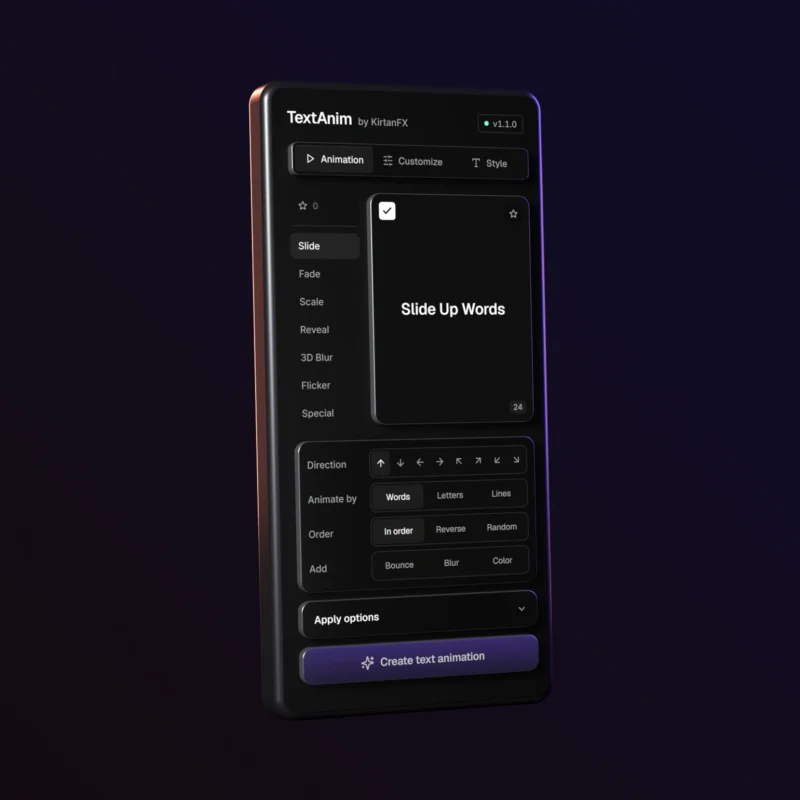
Hover to preview. Pick the direction, Letters, Words or Lines, and the order. Add Bounce, Blur or Color, then double-click the preview or click Create text animation.
Save your setups as Favorites
Click the star to save any setup. Find it in Favorites by name and apply it to any text, in any project.
Change it after you apply
Switch In, Out or In + Out, change the speed and easing, and reveal with Blur, Color, Scale and more. With Follow trim on, the animation moves when you trim the layer.
Style it without leaving TextAnim
Change the font, size, color and stroke. Snap the text to one of nine spots, then add a look: Gradient, Shadow, Glow, Shine or Bevel.
What’s Inside
- TextAnim plugin for After Effects (TextAnim.zxp)
- 300+ text animation variations, including Slide, Bounce, Fade, Scale, Reveal, 3D Blur Reveal, Flicker, Digital Scramble and Typewriter
- 5 looks: Gradient, Shadow, Glow, Shine and Bevel
- Wiggle for the whole text, words or letters
- README.pdf + How To Install video
- Your personal license key
Zero Keyframes. Zero Preset Hunting. One Click to Animate Any Text.
Compatibility


Coming soon
- Adobe After Effects 2023 and above.
- Windows and Mac.
- Premiere Pro: coming soon.
Edit in Premiere Pro? See Text Animator Pro.
How to Get Started
- Download the ZIP from My Account > Downloads and extract it.
- Install TextAnim.zxp with the free ZXP Installer.
- In After Effects, open Window > Extensions > KirtanFX TextAnim.
- Paste your license key and click Activate.
- Watch the included How To Install.mp4 for every step.
Frequently Asked Questions (FAQ)
1. Do I also need the Text Animation Presets Pack?
No. All the animations are built into TextAnim. You never install or browse preset files yourself.
2. Can I use it for client and commercial projects?
Yes. Commercial use is included: YouTube, ads, Reels and client work.
3. Where do I find my license key?
On the order confirmation page, in your order email and in My Account on kirtanfx.com.
4. I’m moving to a new computer. What do I do?
In the TextAnim menu, choose License… and deactivate this computer. Then activate TextAnim on the new one. Or contact us.
5. How do I get updates?
TextAnim tells you when a new version is out. Download it from My Account > Downloads and install it the same way.
6. Can I get a refund?
All extension and plugin sales are final, so please watch the videos on this page before you buy. See our Refund Policy.
7. What if I run into issues?
Contact us at kirtanfx.com/contact or join the KirtanFX Discord for fast support.
The best text animation plugin you’ll ever need in After Effects.
Animate any text in just a few seconds.
Reviews
There are no reviews yet.